Salta al contenuto principale
Home
  • English
  • Italian

Main navigation

  • Home
  • PickMeApp Light
  • Pro
  • Free Tools
    • PickMeApp Relocator
    • PickMeApp Installer
  • Downloads
  • News
  • Support
    • Manuale utente
    • FAQ
    • Forum
    • Search
  • Accedi

3.8 Exiting PickMeApp

  1. Manuale utente
  2. @3 USING PICKMEAPP PRO
  3. 3.8 Exiting PickMeApp

When you exit PickMeApp, all PickMeApp settings are stored in the settings.xml file located in PickMeApp folder. The settings are ready for use the next time you start PickMeApp.

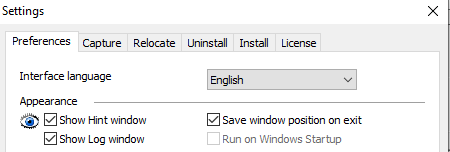
Note: From the Appearance section in Settings > Preferences, you can save the position of the PickMeApp Pro window on exit so that next time you run the program, it will appear in the same position.
3.8 26

  • Versione stampabile

Navigation

  • @1 INTRODUCTION
  • @2 SETTING UP PICKMEAPP PRO
  • @3 USING PICKMEAPP PRO
    • 3.1 Starting PickMeApp Pro
    • 3.2 Setting Your PickMeApp License
    • 3.3 The PickMeApp Pro User Interface
    • 3.4 Choosing a Language for PickMeApp Pro
    • 3.5 Customizing the PickMeApp UI
    • 3.6 Updating PickMeApp Pro
    • 3.7 Rolling PickMeApp Version Back
    • 3.8 Exiting PickMeApp
    • 3.9 Making a Portable PickMeApp Pro
  • @4 MANAGING INSTALLED PROGRAMS
  • @5 MANAGING INSTALLATION PACKAGES
  • @6 MANAGING YOUR OWN INSTALLATION PACKAGES COLLECTION
  • @7 PICKMEAPP PRO COMMAND LINE INTERFACE
  • @8 PICKMEAPP LIGHT
  • @9 PICKMEAPP INSTALLER
  • @10 TROUBLESHOOTING ISSUES IN PICKMEAPP
  • @11 OPTIMIZING PICKMEAPP
  • @12 PICKMEAPP RELOCATOR
  • OLD MANUAL

Footer

  • Privacy
  • Company
  • Terms & Conditions
  • Contact us
  • Cookie settings

Copyright © 2026 PickMeApp.com