Thinking of moving to another PC? Get a free report showing how the applications on your PC compare with programs successfully transferred using PickMeApp. See which applications already have matching transfer records before choosing Pro or Light.
PickMeApp Installer collects information about your installed applications and sends it for comparison with recorded successful transfers. You can request the report without buying a PickMeApp license.
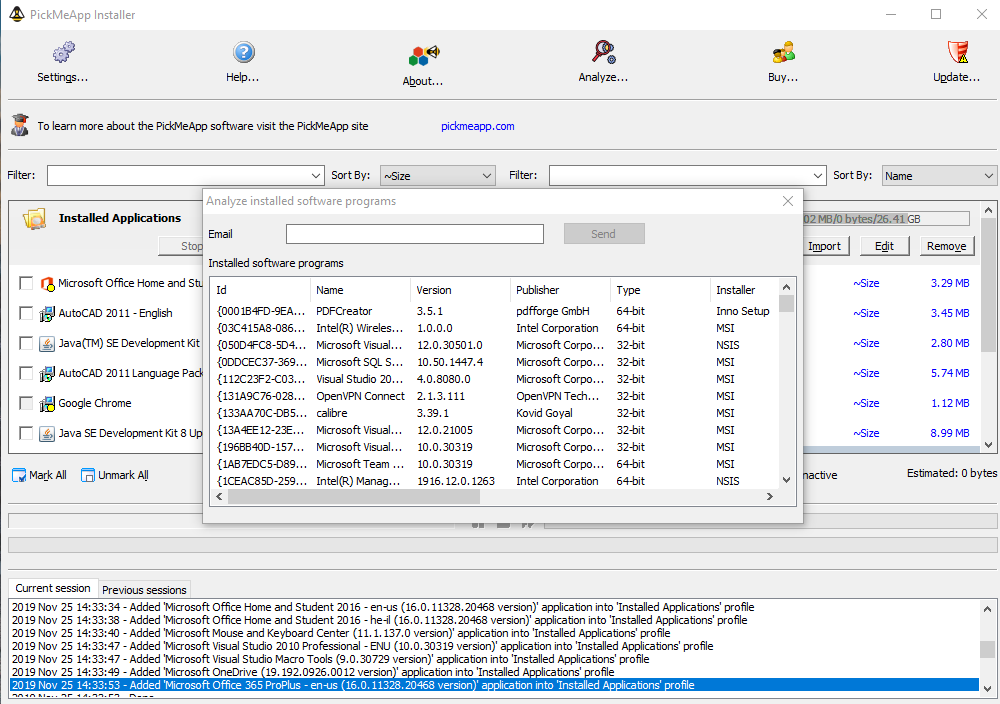
Get your free report
- Click the Analyze button located on the upper bar of the PickMeApp Installer.
- Provide an email address to where the final report can be sent.
- Click the Send button.
Once the PickMeApp servers finish their supportability analysis, it sends a detailed report via email.
Note: Only one (1) analysis request can be sent every 15 minutes.
Read your results
Your report uses stars to show how closely the applications on your PC match recorded successful transfers. More stars mean a closer match. The stars describe transfer history, rather than a new capture or transfer test on your PC.
You can also search the transferable applications catalog to explore recorded transfers. For the next step, see capturing an application with Pro or compare editions and downloads.